DOCCB document management products — 2026 release

Sign your documents, archive them, and retrieve them in seconds

An Arabic-first suite covering the full document journey: DOCCB PDF Signer to edit, sign and stamp PDF files on your device, and DOCCB Archive to archive, approve and sign them, search inside their content and track their expiry — with Administrative Communications and Nova for larger archives.

  • Arabic & English interface
  • Gregorian dates with Hijri alongside
  • Made in Saudi Arabia
DOCCB Archive
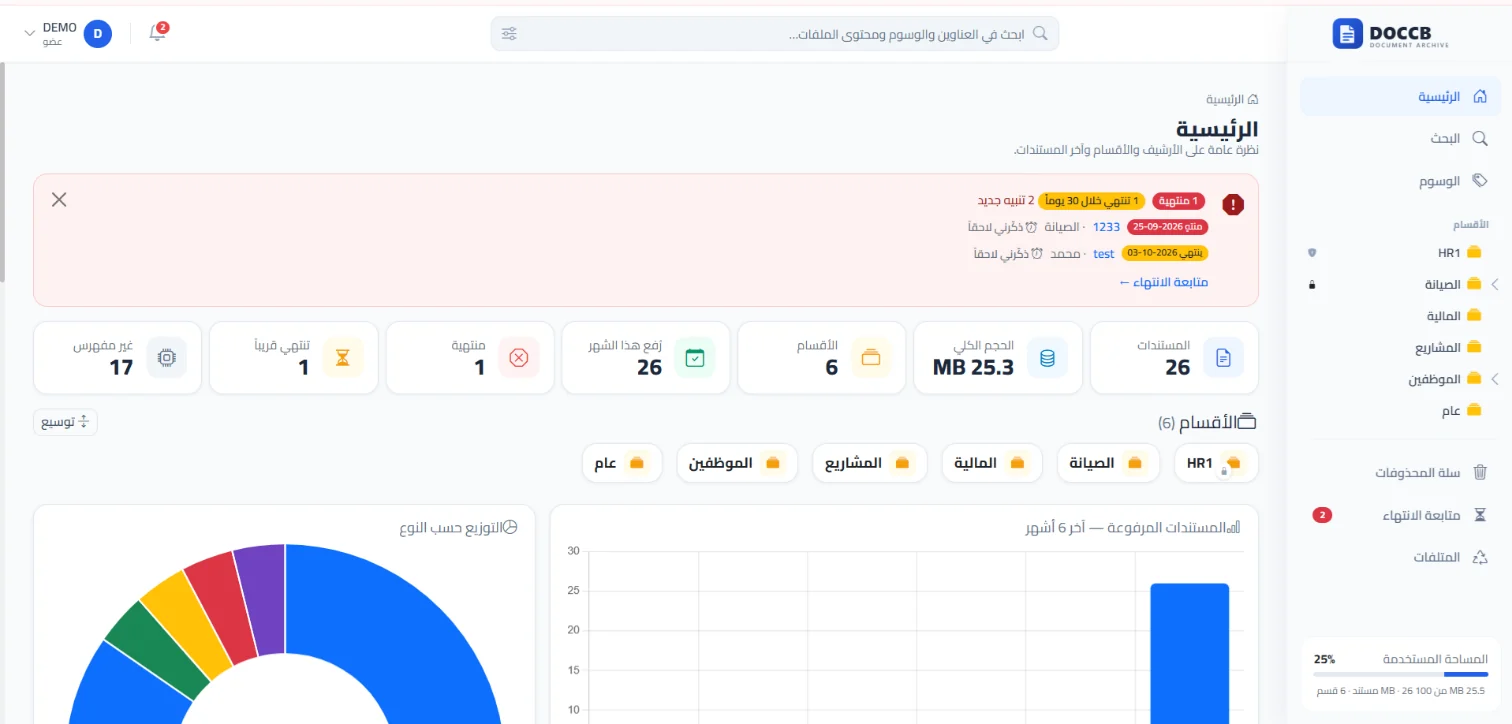
DOCCB Archive dashboard: document and section metrics with expiry alerts
DOCCB PDF Signer
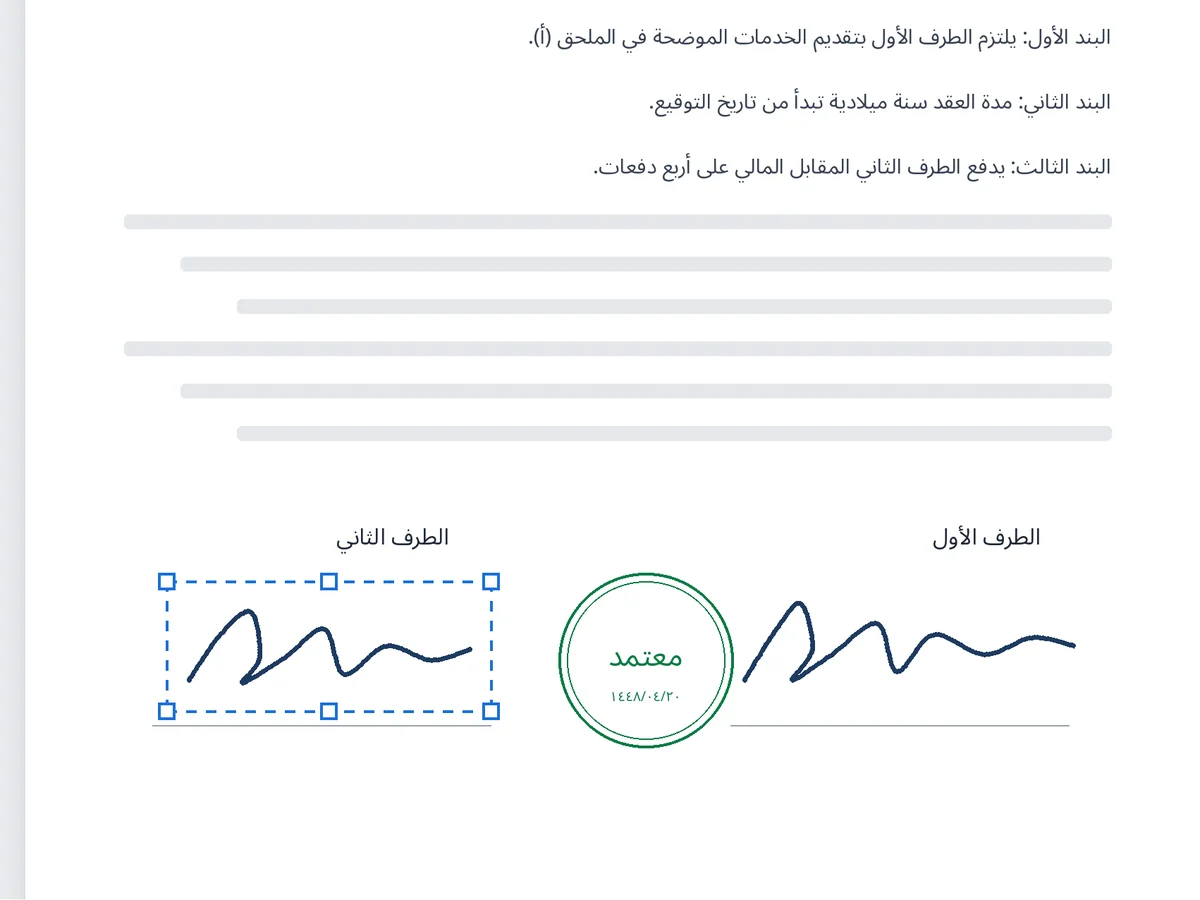
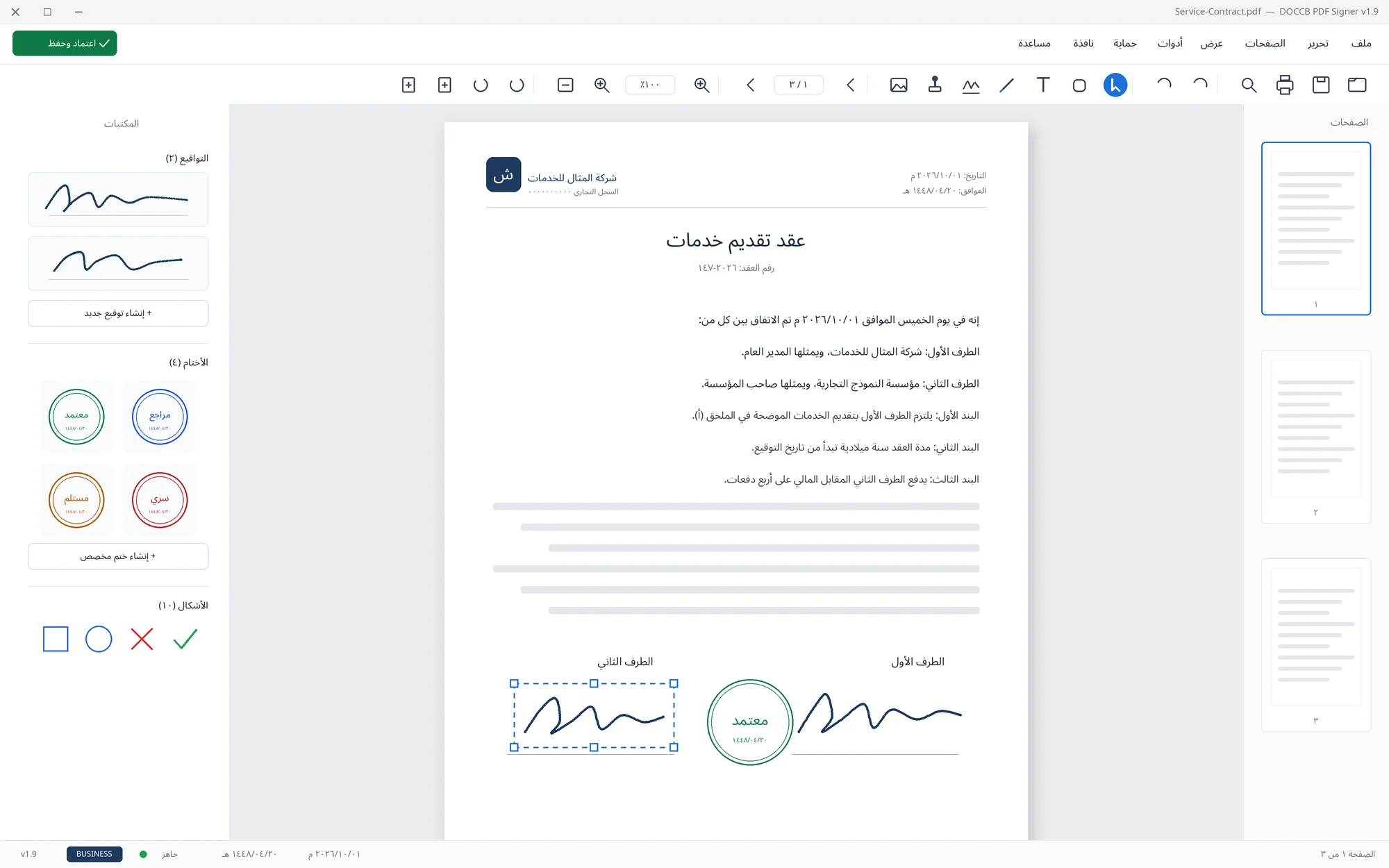
DOCCB PDF Signer while signing and stamping a contract
Expiry alertA contract expires within 30 days
PKI digital stampApprove documents securely and reliably
Runs in the browserDOCCB Archive needs nothing installed on staff devices
Your files never leave your deviceDOCCB PDF Signer processes everything locally
Full-text searchEven inside scanned documents
Arabic-first by designRight-to-left interface with no long training
The DOCCB suite

Four products, one complete document lifecycle

Every product works on its own and is licensed separately. Start with what you need today, and add more as your needs grow.

DOCCB Archive
The smart e-archiving & approvals system, in the cloud

Move your organization from paper archives and scattered shared folders to one organized, secure, searchable digital archive — from a single browser.

  • Upload whole folders by drag & drop, keeping their structure
  • Instant search inside document content, with Arabic OCR
  • Approval workflows, e-signing & stamping, barcode labels (Pro Plus)
  • Track contract and license expiry with timely alerts
Managed cloud or private hosting4 plans
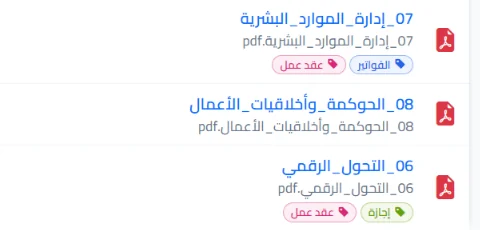
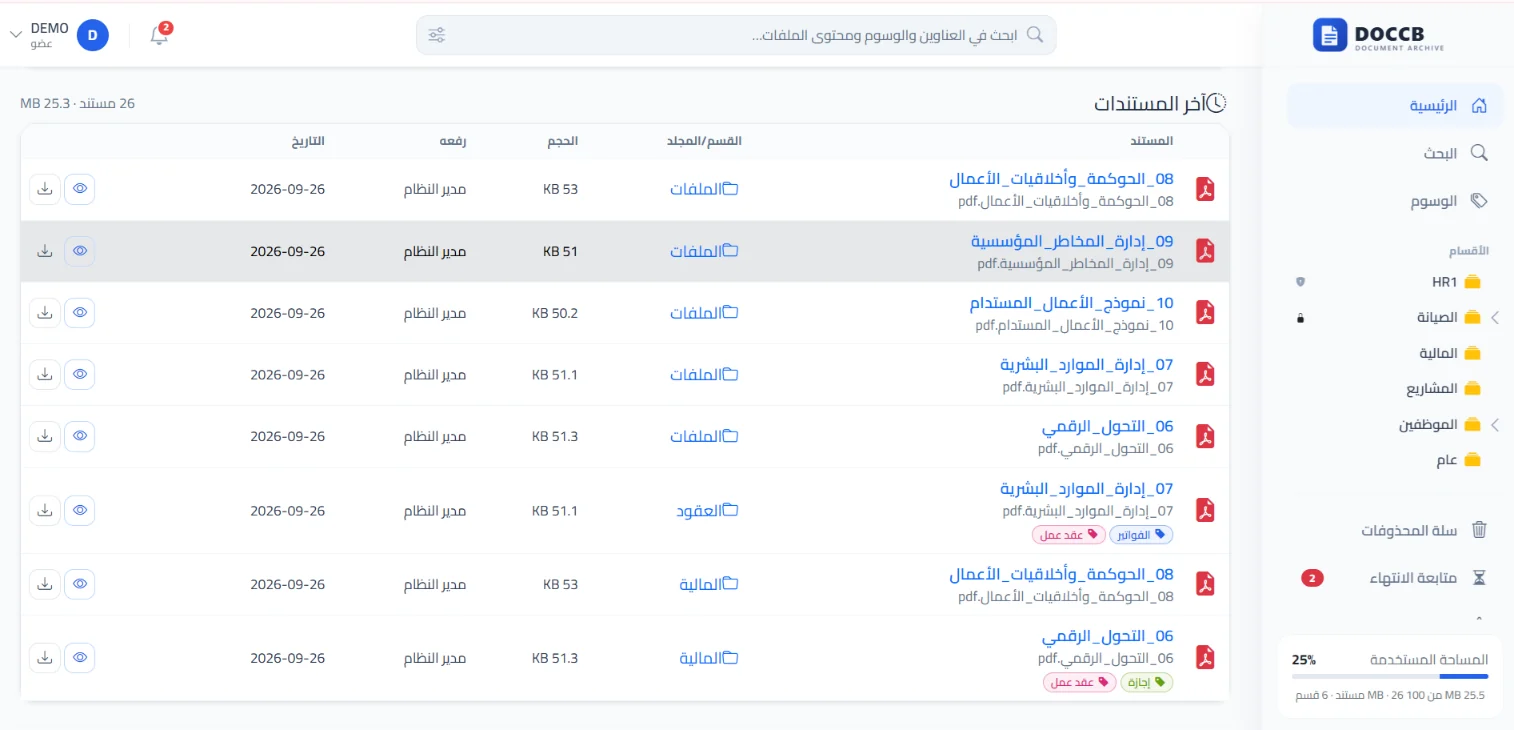
Recent documents list in DOCCB Archive with sections and tags
DOCCB PDF Signer
PDF editing & signing for Windows

Sign by hand, place stamps, arrange and merge pages — on your device, with no document ever uploaded to a server. The Business edition adds PKI digital stamping, encryption and batch processing.

  • A saved library of signatures and stamps you reuse on every document
  • Stamps with Gregorian dates and Hijri alongside
  • Content editing, page management and file merging
  • Works offline after activation
Windows 10 / 11From SAR 175/year
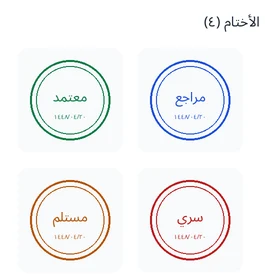
DOCCB PDF Signer with the signatures and stamps library
The document lifecycle

From first signature to destruction, one clear path

A document is approved, then filed in its section, then retrieved and shared securely, then tracked until the end of its validity.

Approve

Sign and stamp the document by hand, or apply a PKI digital stamp.

DOCCB PDF Signer or DOCCB Archive (Pro Plus)

Archive

Upload the document, or a whole folder, into its section under its real file name.

DOCCB Archive

Retrieve & share

Search inside the text, and share with a password-protected, expiring link.

DOCCB Archive

Track & destroy

Get alerted before expiry, and record paper-original destruction with an official report.

DOCCB Archive
Smart search

Find any document in seconds

Search is not limited to the file name; it reaches the text inside the document itself — even scanned pages — with a snippet showing where the word appears.

  • Instant results as you type, ranked by relevance
  • Filters by section, type and date
  • Colored tags from an approved list your organization manages
Document list with section, size and upload date
Documents with colored tags
Document lifecycle

Never miss an expiry date

Set the validity of contracts, licenses and certificates, and the system alerts you well before they expire — inside the system and in a periodic email digest.

  • A central follow-up page with renew, postpone and resolve actions
  • Record paper-original destruction with the report number and date
  • An official printable report with signature fields
Alert listing expired and soon-to-expire documents with archive metrics
DOCCB Archive main dashboard
Signing & approval

Just like paper, without the printing

Open the document, drag your saved signature or stamp into place, and save. No scanning and no back-and-forth emails.

  • Ready-made stamps (Approved, Reviewed, Received, Confidential) or a custom stamp
  • PKI digital stamp proving the signer's identity (Business)
  • Sign dozens of files in one batch with ready templates (Business)
Both parties' signatures and an Approved stamp on a contract in DOCCB PDF Signer
The stamps library in DOCCB PDF Signer
Security & data protection

Your archive holds your organization's most valuable information — and it is built on that premise

DOCCB Archive went through a full security review before release, and DOCCB PDF Signer runs entirely on your device so your documents never leave your control.

  • No direct file access on the server; every file is served or downloaded only after verifying the user's permission on its section.
  • Section-level permissions that can confine each employee to their own sections, with no self-escalation of privileges.
  • A detailed event log for every operation, including failed sign-in attempts, with temporary lockout and email security alerts.
  • Every uploaded file is validated by its actual content, not its extension, and executable files are blocked.
  • In DOCCB PDF Signer all processing is local: signing, stamping, encryption and search. Our servers are contacted only for activation and updates.
  • PDF encryption with passwords and print/copy/edit permissions (DOCCB PDF Signer — Business edition).
  • A protected transaction log and a verification log that document every action and every approved copy securely and reliably (DOCCB Archive — Pro Plus).
  • Saved signatures and stamps in DOCCB Archive are encrypted (AES-256) and can only be used after confirming the password with a one-time code.
FAQ

Before you choose

What is the difference between DOCCB Archive and DOCCB PDF Signer?
DOCCB Archive is a cloud system that runs in the browser for a whole team, and now includes approval workflows, e-signing and stamping in the browser (Pro Plus plan) alongside archiving, search, permissions and expiry tracking. DOCCB PDF Signer remains the choice for processing PDF files locally on a device, and for certificate-based digital signing without a connection — and the two integrate: a document opens from its transaction, gets signed, and returns to the system automatically.
Do I need all the products?
No. Each product works independently and is licensed separately. Start with what you need, then add others to cover the full document lifecycle: approval, then archiving, then follow-up.
Where is our data stored?
With DOCCB Archive you choose between managed cloud hosting (we handle hosting, updates and backups) or private hosting on your own servers with the Enterprise plan. With DOCCB PDF Signer, documents stay on your device and are never uploaded to any server.
Do the products support Hijri dates?
Yes. The Gregorian calendar is the basis for storage and operations, and the Hijri date is displayed alongside it in the interface and upload dates. The stamp editor in DOCCB PDF Signer supports both calendars.
How can I try before buying?
DOCCB PDF Signer: download it and try every feature for 14 days with no payment card. DOCCB Archive: request a live demo on data that resembles your organization's.
Will you help us migrate our existing archive?
Yes. We help you design the section structure and migrate your current archive — and you can upload a whole folder with its structure in one step, or import a complete archive from a ZIP file.

Start organizing your documents this week

Request a DOCCB Archive demo, or download DOCCB PDF Signer and try every feature for 14 days.